Modernize Your School’s Attendance: Introducing the SchoolsFocus BioAttendance System
Are you still relying on manual registers for students or paper sign-in books for staff? We know the struggle: it’s time-consuming, prone to errors, and difficult to track who actually arrived on time.
We are excited to introduce the SchoolsFocus BioAttendance System - a robust, biometric solution designed to bring speed, accuracy, and accountability to your school’s daily routine.
Here is everything you need to know about how it works and why it’s the upgrade your school needs.
What is SchoolsFocus BioAttendance?
The BioAttendance system is a digital attendance management tool that uses biometric technology - fingerprints, facial recognition, or smart cards—to log attendance.
Unlike many systems that only focus on employees, this system works for both Staff AND Students. It completely eliminates the need for roll calls or manual signing.
How It Works: The "Bridge" Concept
The system relies on three main components working together:
- Your Online Portal: Where all your student and staff data lives.
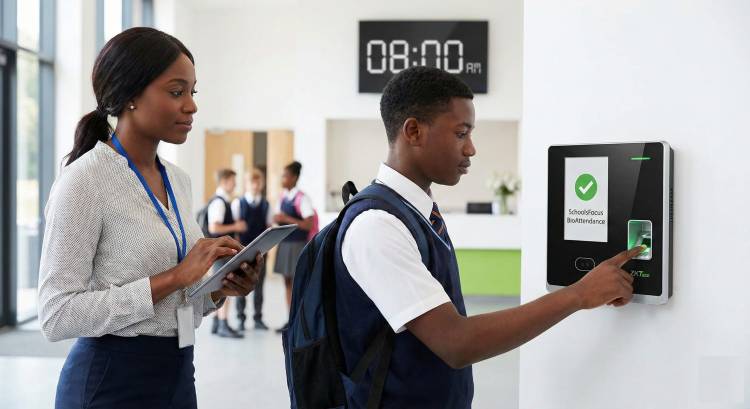
- The Attendance Machine: The physical device (ZKTeco terminal) where users place their finger or stand for facial recognition.
- The BioAttendance Software: A Windows PC application that acts as the "bridge" between the machine and your portal.
The Workflow:
- Setup: You install the BioAttendance software on a school computer. This software pulls user lists from your online portal and pushes them to the attendance machine.
- Enrollment: You capture the fingerprints (or faces) of your staff and students once on the machine.
- Scanning: Daily, users simply scan their finger or face. The machine instantly recognizes them—no need to select names or sort through lists.
- Syncing: The software extracts these records from the machine and uploads them to your SchoolsFocus portal.
Key Features & Benefits
Instant Parental Notifications (Email & SMS)
Safety is a priority for every parent. When your attendance computer is connected to the internet, the system provides real-time updates. The moment a student scans their finger to clock in or clock out, the system can automatically send an Email or SMS to their parents.
This gives parents immediate peace of mind knowing their child has arrived safely at school in the morning and has left the premises in the afternoon.
Complete Clock-In & Clock-Out Tracking
Attendance isn't just about showing up in the morning. The system fully supports both Clock-In (Arrival) and Clock-Out (Departure) cycles.
- For Staff: Track exactly how many hours your teachers are on site. You can identify who leaves before closing time and ensure payroll accuracy.
- For Students: Ensure students stay for the full duration of school hours.
- Late Tracking: You can set specific timelines on your portal. If a user scans in after the set time, they are automatically marked as "Late."
Works Offline (Standalone Mode)
One of the most frequent questions we get is: "Do we need constant internet?" The answer is no.
The ZKTeco attendance machines (K-series and MB-series) are battery-powered and rechargeable. You can place the machine at the school gate or reception and take attendance all day without being connected to electricity or the internet. You only need to connect the machine to your computer when you are ready to sync the data or trigger the notification emails.
Unbeatable Accuracy & Speed
The system is designed for speed. When a student or staff member places their finger on the sensor, the device automatically detects who they are and logs the time. Since it uses biometrics, students cannot mark attendance for their absent friends (eliminating "buddy punching").
Hardware & Requirements
To get started, your school needs to be on the SchoolsFocus Premium Plan.
The Software License
The BioAttendance Windows software requires a one-time license fee of N50,000. This can be installed on multiple computers if necessary.
The Hardware (ZKTeco Terminals)
You will need a ZKTeco Attendance Terminal. We recommend the following models based on your needs:
- K-Series (K40, K60, K70): Great for fingerprint and smart-card attendance.
- MB-Series (MB160, MB360, MB460): Recommended if you want Facial Recognition in addition to fingerprints.
Tip: You can purchase these machines directly through your SchoolsFocus portal or from a reputable local computer accessory shop.
Ready to Upgrade?
Moving to biometric attendance isn't just about "looking high-tech"—it's about saving valuable administrative time, improving student safety, and ensuring your records are tamper-proof.
Log in to your Portal to Get Started
Note on Hardware Verification:
If you purchase your device from a third-party retailer, please verify its authenticity before payment. You can enter the device's serial number at the official ZKTeco page here: https://www.zkteco-wa.com/support/anti-counterfeiting


Leave a Reply
-
Safeguarding Student Data: Security and Data Privacy in...
-

Centralized Data Management: Streamlining School Operations...
-

Training your Students for the Future
-


10 Back to School Tips for Parents: How to Prepare Your...
-


Staying Up to Date in Your Profession as an Educator: The...
-


Collaboration: A Framework for an Effective School Management